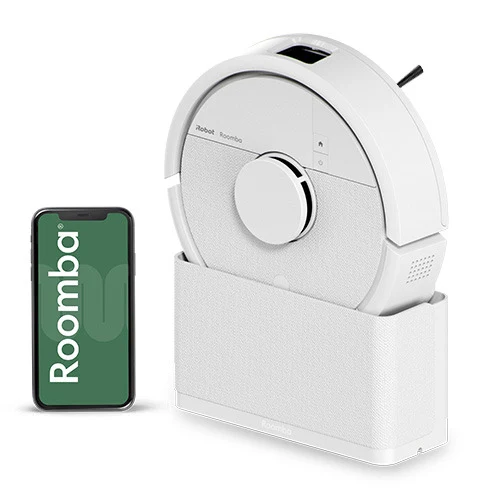
Controls / App
Roomba Home
Execution / JAN
0885155053688
Robot care / Bin
Empty and wash as needed
Navigation / LiDAR
ClearView
Robot / Robot mass
≈2 kg (Approximate mass)
Dock care / Sensors
Clean monthly
Robot care / Filter
Clean weekly, twice weekly with pets; replace every 3-6 months (Replacement intervals depend on wear)
Connectivity / Wi-Fi
2.4 / 5 GHz
Power / Battery type
Lithium-ion
Robot care / Sensors
Clean monthly or as needed
Cleaning / Main brush
Single bristle-and-rubber brush
Dock care / IR window
Clean monthly
Power / Recharge time
≈6 h
Carpets / Carpet Boost
Supported
Cleaning / Dirt Detect
Not provided
JP box contents / Dock
SlimCharge
Controls / Button start
Button without Wi-Fi
Execution / Item number
F115260
Robot care / Edge brush
Clean every 2 weeks; replace every 3-6 months (Replacement intervals depend on wear)
Robot care / Main brush
Clean weekly; replace every 6-12 months (Replacement intervals depend on wear)
Carpets / Long-pile rugs
Operation may be impossible
Connectivity / Bluetooth
Supported
Filtration / Filter type
Efficient Particulate Air Filter
Power / Battery capacity
2400 mAh
Robot care / Bin washing
Warm water with filter removed; dry before reassembly (Do not wash the filter; bin is not dishwasher safe)
Robot care / Brush cover
Inspect every 6 months; replace if damaged (Replacement intervals depend on wear)
Robot care / Sheet plate
Clean after every use
Cleaning / Cleaning modes
Vacuuming or sheet mopping
Cleaning / Mode switching
Attach or remove the sheet plate
Controls / Low-power mode
Available (App cannot start cleaning in this mode)
Dock / Dimensions L×W×H
8.6×22.2×12.3 cm (SlimCharge in upright orientation)
Execution / Included dock
SlimCharge
Navigation / Mapping time
<10 min (For a room ≤93 m²; complex layouts may take longer)
Robot care / Caster wheel
Clean every 2 weeks or as needed
Carpets / Carpet avoidance
During sheet mopping
Navigation / RF Lighthouse
Not supported
Robot / Dimensions L×W×H
24.5×24.5×9.2 cm
Robot care / Mopping sheet
Discard after each cleaning routine
Cleaning / Suction pressure
7000 Pa
Controls / Voice assistants
Alexa; Siri; Google Assistant (Via a compatible external device)
Dock / Automatic mop drying
None
Navigation / Keep-out zones
Supported
Power / Recharge and resume
Supported (With SlimCharge positioned horizontally)
Robot care / Robot contacts
Clean every 2 weeks or as needed
Dock / Automatic mop washing
None
Robot sensors / Cliff sensor
Present
Cleaning / Hard-floor runtime
180 min (iRobot Home Test Lab testing; actual runtime may vary)
Controls / Inactivity timeout
90 min (Off the dock; not cleaning runtime)
Dock / Automatic water supply
None
Dock care / Charging contacts
Clean monthly
JP box contents / Sheet plate
1
Maintenance / Bin-full sensor
None
Navigation / Cleaning pattern
Perimeter, then neat rows
Navigation / LiDAR protection
Detector bumper
Robot sensors / Carpet sensor
Present
Execution / Regional execution
Japan
Robot sensors / Rear IR sensor
Present
Mopping assembly / Mopping tool
Single-use mopping sheet
Navigation / Obstacle avoidance
Supported (Accuracy depends on conditions; avoidance is not guaranteed in every situation)
Power / Charge before first map
4.5 h (First-use recommendation; not the regular recharge time)
Spot cleaning / Spot Clean area
1×1 m (Two passes in perpendicular directions)
Controls / Full digital features
Require the app and Wi-Fi
Dock / Automatic debris disposal
None
Execution / Selected item colour
White
Robot care / Sheet-plate washing
Hand-wash in cold water, then air-dry
Robot capacities / Dry-debris bin
200 ml
JP box contents / Built-in battery
1
JP box contents / Maintenance tool
Included with dock
Mopping assembly / Water refilling
Not required for sheet mopping
Navigation / Physical Virtual Wall
Not supported
JP box contents / Single-use sheets
30
SlimCharge / Position for schedules
Horizontal (Scheduled cleaning does not work in upright storage)
Navigation / Suggested map-size limit
≤60 m² (Map-size limit; not cleaning throughput)
Mopping assembly / Sheet compatibility
Own sheets and some third-party sheets, including Kao Quickle (Compatibility depends on shape and material; not all third-party sheets fit)
JP box contents / Dock power connection
Power adapter
Wi-Fi compatibility / SSID and password
A-Z, a-z, 0-9 (Troubleshooting recommendation: no Japanese characters or symbols)
Controls / Scheduling and room selection
Via the app (MiniSlim stand must be horizontal)
Manufacturer comparison / Relative suction
≤70 × (Compared with Roomba 600; manufacturer comparison as of February 2025)
SlimCharge / Starting from upright storage
Place robot on the floor and return it manually after cleaning
Wi-Fi compatibility / Encryption for troubleshooting
WPA2, without WPA3 or mixed WPA3/WPA2 (Manufacturer recommendation when the app cannot connect)
Manufacturer comparison / Bundle floor-space reduction
85 % (Compared with Roomba 105 Combo + AutoEmpty; SlimCharge in upright storage)